Pi vs Hermes vs Codex vs Claude Code: Which AI Agent Fits?
A source-based comparison of Pi Agent, Hermes Agent, Codex, Claude Code, and MCPlato for coding, automation, permissions, and long-running work.
If you are comparing Pi Agent vs Hermes Agent, or deciding between Codex and Claude Code, the answer is not a universal leaderboard:
- Choose Pi for a small, transparent terminal harness you expect to customize.
- Choose Hermes for a persistent, cross-channel assistant with memory and scheduled automation.
- Choose Codex for managed software work across local coding surfaces and cloud workflows.
- Choose Claude Code for an integrated coding system spanning terminal, IDE, desktop, web, CI, and team controls.
- Choose MCPlato when the job crosses code, research, local files, browser work, and reviewable office deliverables.
The underlying model still matters, but the harness determines what the model can access, how it asks for permission, how work survives a long session, and what you can review at the end.
Research and editorial note, updated July 10, 2026: This comparison was prepared by the MCPlato Research Team from official product documentation and public repositories. It is a documentation-based capability comparison, not a standardized hands-on benchmark. We did not rank model intelligence, measure task completion rates, or use affiliate placement. Product capabilities can change, so verify security, availability, and pricing in the linked official sources before adoption.
The short answer
| If your priority is... | Start with | Why |
|---|---|---|
| A minimal terminal coding harness | Pi | Four default tools, a compact interaction model, session branching, and deep extension points |
| A persistent assistant reachable from chat platforms | Hermes | Memory, skills, gateways, subagents, scheduling, and multiple terminal backends |
| Managed coding across CLI, IDE, desktop, and cloud | Codex | Local and hosted coding workflows with documented sandbox and approval controls |
| A broad professional coding workflow | Claude Code | Repo editing, commands, IDE and web surfaces, CI integrations, subagents, skills, hooks, permissions, and sandboxing |
| Multi-session knowledge work and finished artifacts | MCPlato | Workspaces that combine local materials, research, separate workstreams, and human-reviewed outputs |
No row means “best model.” It means “best starting shape for this workflow.”
How we compared the five agents
We reviewed each product against seven questions:
- Primary job: Is it mainly a coding harness, a persistent assistant, a managed coding product, or a broader workspace?
- Default surface: Does work begin in a terminal, editor, desktop workspace, browser, cloud task, or messaging channel?
- Extensibility: Can teams add tools, skills, hooks, MCP servers, packages, or custom agents?
- Continuity: How do sessions, memory, branches, background tasks, or cloud execution carry work forward?
- Permission model: Are approvals, allow/deny rules, sandboxing, or project trust built in, configurable, or left to the user?
- Automation: Can it run non-interactively, in CI, on a schedule, or through another application?
- Deliverable: Is the natural output a diff and pull request, an assistant response, or a broader artifact such as a report or deck?
The evidence cutoff is July 10, 2026. We excluded GitHub star counts, package version numbers, and pricing tables because they become stale quickly and do not prove product quality.
Product fit at a glance
| Product | Primary shape | Strongest fit | Important boundary |
|---|---|---|---|
| Pi Agent | Minimal terminal coding harness | Agent builders and terminal power users who want to assemble their own workflow | Per-action approvals, MCP, subagents, plan mode, and background bash are not core defaults |
| Hermes Agent | Persistent personal-agent framework | Cross-channel assistants, memory, scheduled work, and customizable automation | More persistent state and autonomy create more configuration and review responsibility |
| Codex | Managed coding agent | Software work across local coding clients, cloud tasks, and repository workflows | Its center of gravity is still inspectable software work |
| Claude Code | Integrated coding system | Repository maintenance, refactors, CI, review, and team-governed agent workflows | Breadth does not remove the need to configure permissions and review changes |
| MCPlato | Workspace-first AI environment | Research, local materials, multi-session work, and finished knowledge-work artifacts | It is more workspace than you need for a tiny one-off terminal edit |
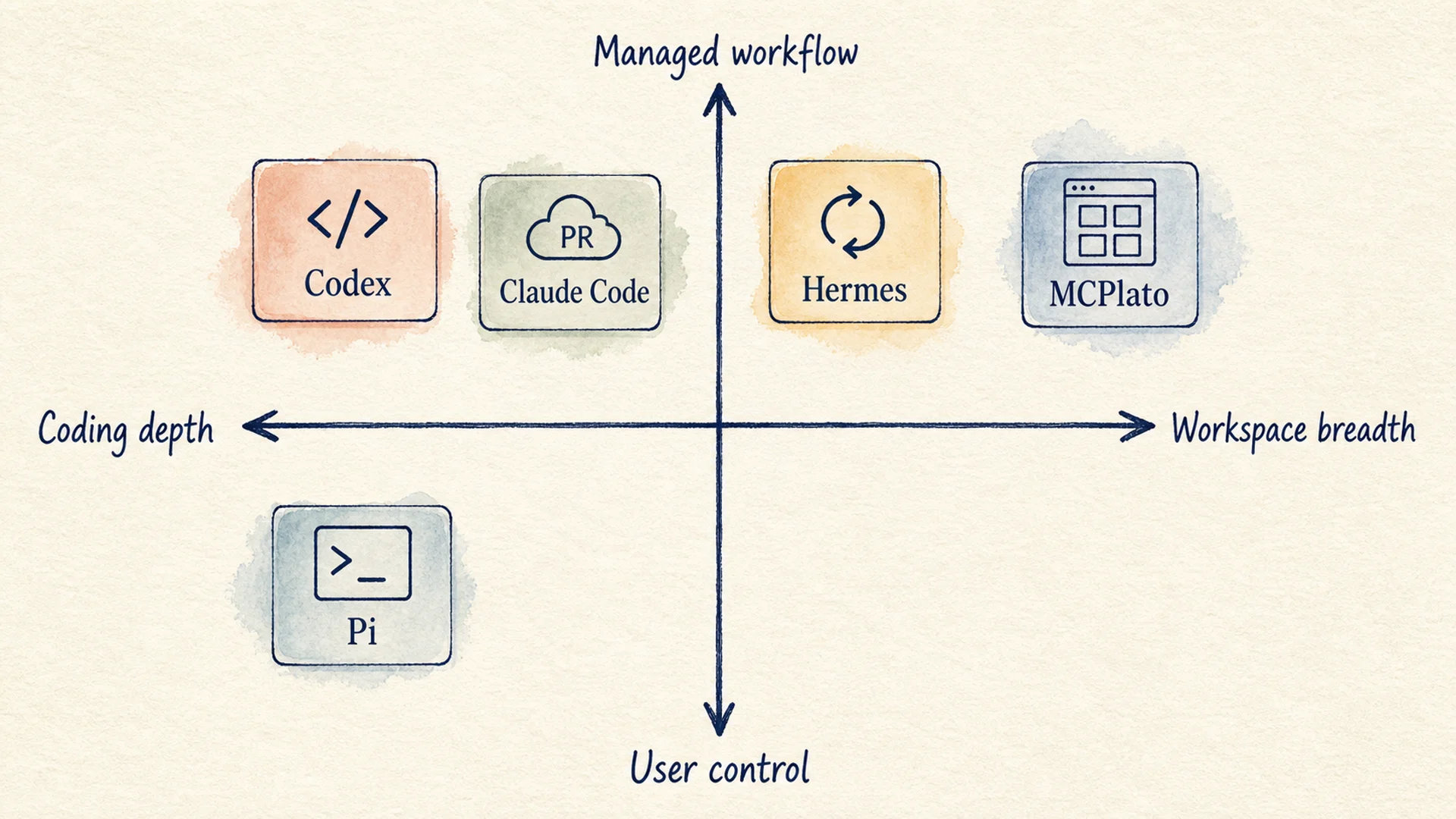 Scenario fit map for Pi, Hermes, Codex, Claude Code, and MCPlato
Figure 1: A conceptual map of product emphasis, not a measured capability score. Real fit changes with configuration and workflow.
Pi Agent vs Hermes Agent: minimal harness or persistent assistant?
This is the clearest contrast in the group.
Choose Pi when you want to build the workflow
Pi describes itself as a minimal terminal coding harness. Its documented default gives the model four tools: read, write, edit, and bash. It supports interactive use, print or JSON output, RPC, and an SDK. Sessions are stored as JSONL trees, with navigation, branching, forking, cloning, and compaction.1
Pi is deliberately opinionated about what does not belong in the core. Its official README says that MCP, subagents, per-action permission popups, plan mode, built-in to-dos, and background bash should be added through extensions, packages, external isolation, or other user-chosen mechanisms.1 Project trust protects the loading of project-local settings and extensions, but it is not a substitute for a complete command-approval policy.
That makes Pi attractive when you want:
- a small control surface;
- a terminal-native loop;
- the ability to replace or extend tools;
- programmatic integration through RPC or an SDK;
- explicit ownership of sandboxing and workflow policy.
The trade-off is operational responsibility. A Pi setup can become highly capable, but the person assembling it must decide how extensions are reviewed, where commands run, which paths are writable, and how long tasks recover.
Choose Hermes when you want the assistant to persist
Hermes positions itself as a self-improving, persistent assistant rather than only a coding harness. Its official materials describe memory, session search, skill creation, messaging gateways, scheduled automations, isolated subagents, and terminal backends including local, Docker, SSH, and hosted environments.23
That makes Hermes a better starting point when the job is:
- reachable through Telegram, Discord, Slack, or another supported channel;
- expected to remember useful context across sessions;
- triggered on a schedule;
- split into parallel delegated work;
- hosted somewhere other than the user's current laptop.
Persistent state is not automatically correct state. Treat memory, learned skills, schedules, and gateway access as configuration that needs owners, logs, and review. Hermes documents command approvals, pairing, and isolation options; use those controls before enabling unattended work.4
Pi vs Hermes in one sentence: Pi is the cleaner foundation for a custom terminal coding loop; Hermes is the fuller foundation for a persistent, connected assistant.
Pi Agent vs Codex: assemble or adopt a control plane?
Pi and Codex can both edit repositories and run commands, but they optimize for different ownership models.
With Pi, the user assembles more of the control plane. Extensions can add tools, custom UI, subagents, permissions, sandbox execution, or MCP. That is valuable when the harness itself is the product you want to shape.
With Codex, sandboxing and approvals are documented product concepts. Codex can work through local coding clients and hosted workflows; its configuration separates filesystem/network boundaries from approval behavior.56 The result is a more managed starting point for teams that want a coding workflow rather than a harness construction project.
Use this test:
- If your first question is “How can I wire my own agent loop?”, start with Pi.
- If your first question is “How can I delegate this repository task and review the result?”, start with Codex.
For a concrete view of the latter workflow, see MCPlato's local coding-agent use case, which shows the reproduce, patch, test, and approve loop as a reviewable scenario.
Pi Agent vs Claude Code: minimal core or integrated engineering workflow?
Claude Code's official overview defines it as an agentic coding tool that reads a codebase, edits files, runs commands, and integrates with development tools. It is available in the terminal, IDEs, desktop app, and browser, with documented paths for CI, MCP, skills, hooks, subagents, scheduled work, and the Agent SDK.7
Its permission system is also more built in than Pi's core. Claude Code documents allow, ask, and deny rules; permission modes; workspace trust; and OS-level sandboxing for shell commands. Anthropic explicitly describes permissions and sandboxing as complementary controls.8
The practical difference is:
| Question | Pi | Claude Code |
|---|---|---|
| Do I get a small default tool loop? | Yes | No; it is a broader coding product |
| Can I customize behavior? | Extensions, skills, prompts, themes, packages | Instructions, skills, hooks, MCP, subagents, plugins/settings |
| Are per-action permissions part of the default product? | No; build or add them | Yes; rules and modes are documented product features |
| Are IDE, desktop, web, and CI workflows built in? | Not as the core product | Yes, across documented surfaces |
| Who owns the workflow design? | Primarily the user or agent builder | Shared between the product, team policy, and user |
Choose Pi when minimalism and hackability are requirements. Choose Claude Code when you want a broader engineering workflow to exist before you customize it.
Codex vs Claude Code: how should teams decide?
Codex and Claude Code overlap more than the other pairings. Both can understand a repository, edit multiple files, run commands, use project instructions, connect external tools, delegate work, and support team workflows. A marketing feature checklist will not settle the decision.
Run a controlled evaluation instead:
- Select three representative tasks: a small bug, a cross-file change, and a failing-test investigation.
- Give both tools the same repository state, instructions, network policy, and completion criteria.
- Record first-pass success, human interventions, commands attempted, tests run, diff quality, and time to a reviewable result.
- Repeat with your real permission constraints and CI environment.
- Evaluate administrative fit: identity, policy distribution, audit needs, supported surfaces, and model/provider requirements.
Choose Codex when OpenAI's coding surfaces, hosted workflows, and sandbox/approval model fit your environment. Choose Claude Code when Anthropic's coding ecosystem, permission rules, hooks, CI integrations, and supported work surfaces fit better. Keep both only if their roles are distinct enough to justify the operational overhead.
Where MCPlato belongs in the comparison
The four products above can all participate in coding. MCPlato belongs in the decision when the unit of work is larger than a repository task.
For example, a vendor comparison may require browser research, local notes, an evidence matrix, a written recommendation, and an approval gate. That is closer to MCPlato's agent quality-control workflow than a terminal-only coding loop.
A consulting engagement may begin with a folder of research and end with a client presentation. The research-to-deck use case shows why the final artifact and review experience matter as much as the model response. Repeated workflows can be packaged as Wands so the steps and expected output are reusable rather than buried in a chat transcript.
MCPlato should not be presented as a universal replacement for Pi, Hermes, Codex, or Claude Code. A useful portfolio is often:
- a coding-native agent for repository work;
- a persistent assistant only where cross-channel memory or schedules are justified;
- a workspace layer for research, coordination, and finished artifacts.
Long-running work: compare the recovery story
Any task that lasts beyond one interaction needs more than a large context window.
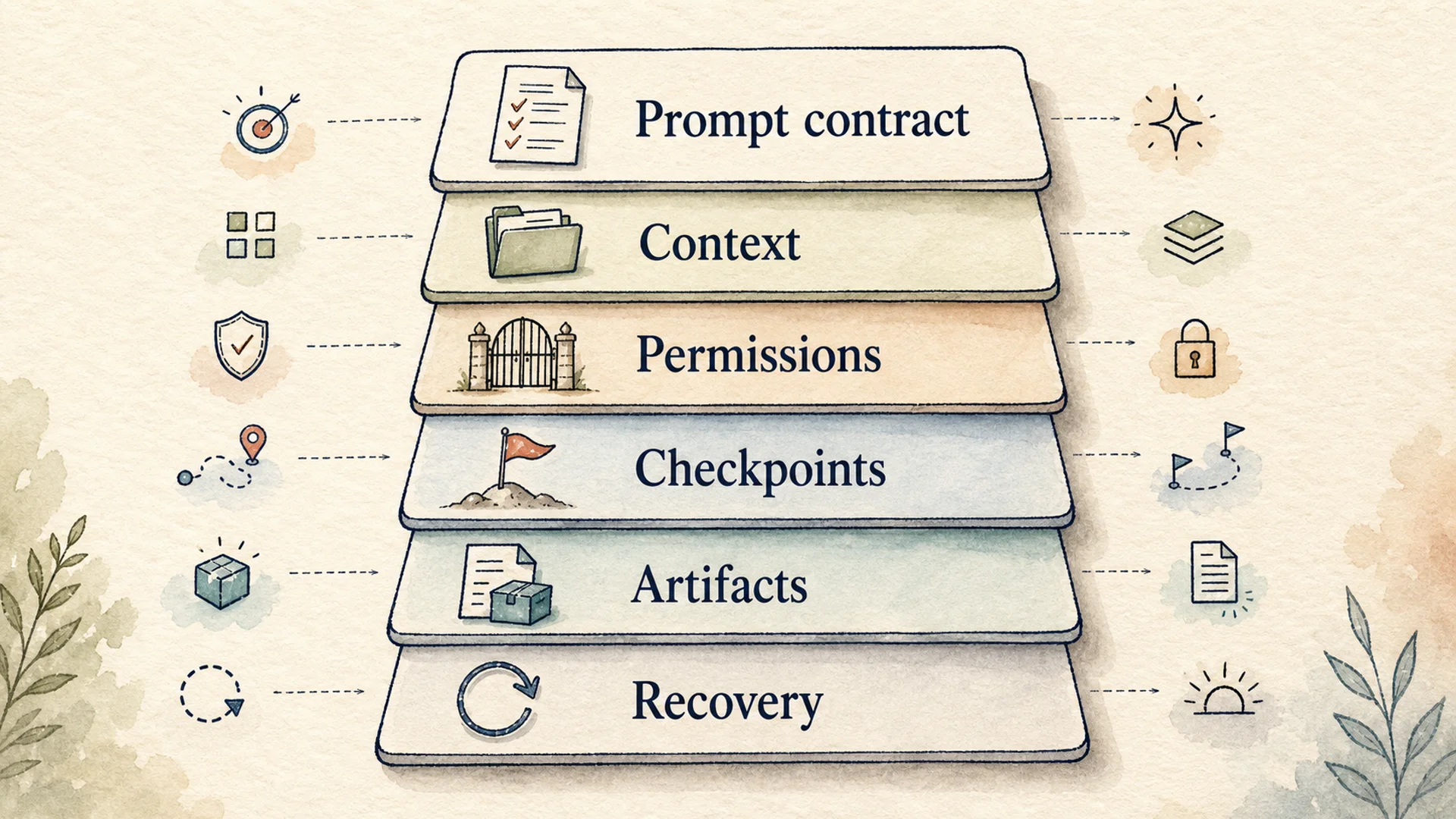 Long-task control stack for AI agents
Figure 2: A practical control stack for long-running work, independent of the chosen product.
Before allowing an agent to run for hours, define:
- Prompt contract: goal, scope, non-goals, and completion evidence.
- Context boundary: approved repositories, files, sources, and credentials.
- Permission boundary: read, write, network, shell, publish, and deploy rules.
- Checkpoints: moments when state and progress can be inspected.
- Artifacts: diffs, test output, reports, evidence tables, or other reviewable deliverables.
- Recovery path: how a human or another session resumes after interruption or failure.
Pi provides session trees and compaction primitives. Hermes emphasizes persistent memory and scheduled/background continuity. Codex and Claude Code provide managed local and hosted work surfaces. MCPlato organizes parallel sessions and artifacts at workspace level. None eliminates the need to define what “done” means.
Permission strategy by risk
Do not compare autonomy without comparing blast radius.
| Risk | Examples | Sensible default |
|---|---|---|
| Low | Read source, search approved docs, summarize local material | Allow within a bounded workspace and keep a transcript |
| Medium | Edit code or drafts, run local tests, create reports | Sandbox writes, require verification, review the artifact |
| High | Push, deploy, delete, publish, send messages, access production | Require explicit approval immediately before the action |
Product controls differ, but the rule is stable: a model's instruction is not a security boundary. Use enforceable filesystem, network, credential, and approval controls, then inspect the result.
Final recommendation
Start from the work, not the brand:
- Use Pi when you want a minimal coding harness and are prepared to own the extensions and security envelope.
- Use Hermes when persistent memory, messaging gateways, schedules, and delegated assistant work are central requirements.
- Use Codex when you want a managed OpenAI coding workflow across local and hosted surfaces.
- Use Claude Code when you want Anthropic's integrated repository workflow and team-configurable permissions, hooks, CI, and agent features.
- Use MCPlato when research, local materials, multiple workstreams, and finished office artifacts must stay connected and reviewable.
Then test the shortlist on the same real tasks. The best agent is the one that reaches a verifiable result with the least hidden state, unnecessary access, and human cleanup.
Official sources
Footnotes
-
Pi coding agent official repository and README. https://github.com/earendil-works/pi/tree/main/packages/coding-agent ↩ ↩2
-
Hermes Agent official repository and README. https://github.com/NousResearch/hermes-agent ↩
-
Hermes Agent official documentation. https://hermes-agent.nousresearch.com/docs/ ↩
-
Hermes Agent security documentation. https://hermes-agent.nousresearch.com/docs/user-guide/security ↩
-
OpenAI Codex documentation. https://developers.openai.com/codex/ ↩
-
OpenAI Codex security documentation. https://developers.openai.com/codex/security/ ↩
-
Anthropic Claude Code overview. https://code.claude.com/docs/en/overview ↩
-
Anthropic Claude Code permissions documentation. https://code.claude.com/docs/en/permissions ↩