
聊天之後的 AI Workspace:Artifacts、多視窗脈絡與 Virtual Partners
一份技術報告,分析為什麼 AI Workspace 正在從聊天走向持久 Artifacts、執行時紀律、平行工作介面,以及面向開發者和架構師工作流的 Virtual Partners。
AI chat 讓前沿模型變得可用,但它並沒有讓 AI 工作天然可靠。
對開發者和架構師來說,限制很快就會出現。聊天執行緒可以解釋設計、起草遷移計畫或總結日誌。但真正的工作不會停留在 transcript 裡。它會變成圖表、規格說明、修補、研究筆記、測試結果、pull-request 評論、事故時間軸、決策記錄和後續任務。工作也會分叉:一個視窗調查生產行為,另一個比較供應商約束,另一個撰寫設計備忘錄,還有一個準備實作步驟。
因此,下一個 AI workspace 不只是更大的聊天框,而是一個管理 work objects、execution state、parallel surfaces 和 delegated continuity 的系統。
本文用四個設計問題描述這一轉變:
- 工作物件是什麼? 系統是在生成答案,還是生成可檢查、可修訂、可交付的持久 artifact?
- 執行時真相在哪裡? Workspace 是否區分說過什麼、執行過什麼以及改變了什麼?
- 可以平行執行多少個介面? 使用者能否同時保留多個視窗、session、pane 和 context,而不是把一切壓進同一條執行緒?
- 誰負責連續性? 是否存在 workspace 級的 virtual partner,用來拆解、委派、追蹤並綜合跨 session 的工作?
這些問題現在比產品是否有聊天介面更重要。Chat 是入口,workspace 才是控制平面。
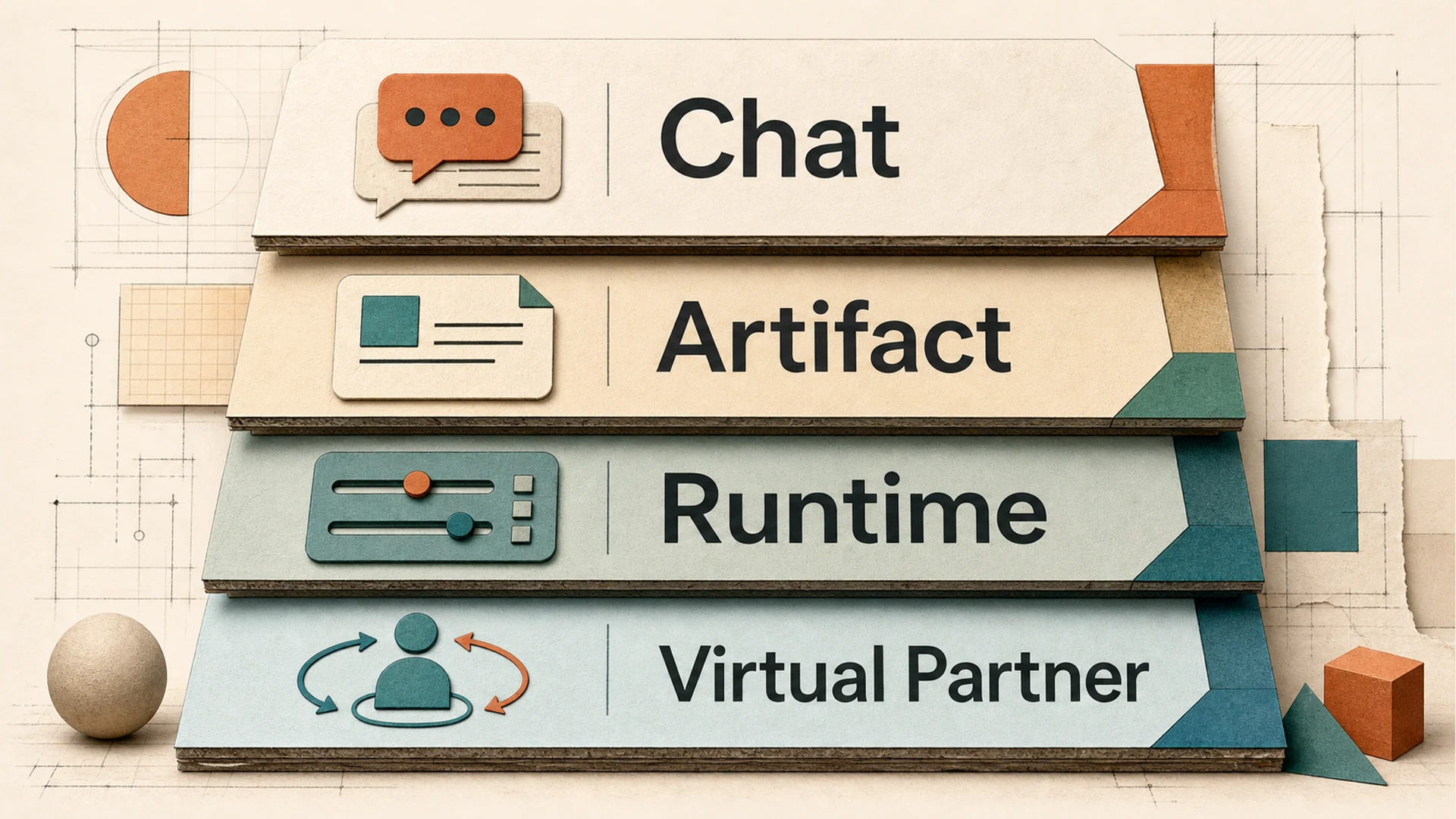 Four layers of AI work: Chat, Artifact, Runtime, and Virtual Partner
1. 為什麼聊天框不夠
聊天框很適合輪流對話,卻不擅長保留工作邊界。單一 transcript 會混合使用者意圖、模型推理與中間假設、工具結果、可能成為交付物也可能不會的草稿、應該持久保存的決策、暫時失敗,以及可能需要審計或重放的行動歷史。
短問答可以容忍這種混合;一旦 AI 被要求執行多步驟流程、協調文件、使用工具或在 session 之間交接工作,它就會變得脆弱。開發者熟悉這個道理:日誌、原始碼、建置、測試、部署狀態和 issue 評論彼此相關,但不應該被存成一條沒有區分的字串。
同樣的原則適用於 AI workspaces。當 AI 進入嚴肅工作流,workspace 必須區分 conversation 與 output、output 與 runtime state、runtime state 與長期 decision memory。
2. 面向後聊天時代 AI workspaces 的四個設計問題
Question 1: 什麼算工作物件?
Response 是短暫的;artifact 是持久的。在 chat-first 系統裡,價值單元預設是答案;在 workspace-first 系統裡,價值單元通常是 work object:文件、程式碼修補、研究表格、圖、測試計畫、決策日誌、spreadsheet、presentation 或 task board。這個物件應該有狀態,能在生成它的那一輪之後繼續存在,也能在不重放整段對話的情況下被審閱。
這就是 artifact 和 canvas 模式重要起來的原因。Claude 將 Artifacts 描述為獨立且有實質內容的產物,通常超過 15 lines,其支援文件列出每個 artifact 可持久儲存 20 MB。ChatGPT Canvas 也以不同方式處理較長內容;OpenAI 表示,當生成內容超過 10 lines 時,Canvas 可能自動開啟。這些是小產品細節,卻指向更大的方向:重要的 AI 輸出需要自己的介面。
更深層的架構問題不是產品是否開啟側邊欄,而是 artifact 是否有生命週期:draft、inspect、revise、validate、complete,必要時還可以 hand off。
Question 2: 執行時真相在哪裡?
Transcript 是對話記錄,但不總是執行真相的最佳來源。當 agent 編輯文件、呼叫外部工具、開啟瀏覽器、讀取文件或執行測試時,workspace 需要知道的不只是模型說了什麼,還要知道嘗試了什麼、完成了什麼、失敗了什麼、改變了什麼,以及結果由什麼證據支撐。Execution controller 和 transcript 應該相關,但不應相同。
這種分離有三點價值。第一,它提高可靠性:使用者可以追問系統是真的執行了檢查,還是只是聲稱執行了。第二,它提高復原能力:長任務經常中途失敗,理解 execution state 的 workspace 比只有部分敘述的 chat thread 更容易安全復原或改道。第三,它改善治理:團隊環境中的 audit trail 應區分 instruction、action、result 和 decision,尤其是在 agents 橫跨 repositories、documents、SaaS systems 和 local materials 工作時。
原則很簡單:transcript 應該解釋工作,但不應是工作存在的唯一位置。
Question 3: 使用者能承載多少平行介面?
AI 工作正在變成 multi-window。舊模式是一個使用者、一個 assistant、一個 thread;新模式是擁有多層結構的 workspace:
- Workspace:圍繞材料、sessions 和偏好的持久邊界。
- Session:面向任務的 conversation 或 workstream。
- Tab:平行注意力的可見單元。
- Pane:artifact、browser、terminal、document 或 comparison view 的局部介面。
- Window:承載不同階段或專案的作業系統級容器。
這個層級不是裝飾,而是現實工作方式。開發者可能讓一個 session 關注架構取捨,另一個關注實作,另一個關注測試,另一個關注 release notes。架構師可能在一個 pane 比較 cloud-agent 行為,同時在另一個 pane 起草內部標準。好的 multi-window AI workspace 不只是更多螢幕空間,而是 context partitioning system。
Question 4: 誰保持連續性?
Artifacts 和 windows 之後的下一步,是 workspace 級的 partner。它不應被理解為頭像或裝飾性助手;有用的版本更像 orchestrator:理解 workspace goal,拆解工作,委派子任務,追蹤進度,發現缺失證據,並總結決策。使用者仍然擁有判斷,partner 維護 operational memory。
這讓 virtual partner 或 sprite-like workspace presence 具有技術意義。它可以幫助回答:哪些 sessions 是 active、blocked 或 complete?哪個 artifact 是目前候選交付物?哪些 assumptions 尚未驗證?哪條工作分支應合併到最終輸出?哪些 context 因屬於不同任務或權限邊界而應保持隔離?換言之,virtual partner 是 coordination layer。
3. Artifact discipline:從回覆到交付物
Artifacts 常被當成 UI 功能介紹,但更重要的概念是紀律。Claude Artifacts 和 ChatGPT Canvas 都說明生成工作需要獨立、可編輯的介面。Claude Projects 還加入了更廣的專案脈絡模型:Anthropic 描述 Projects 支援 200K context window,大約相當於一本 500-page book。ChatGPT Projects 則圍繞 chats、files 和 instructions 建立 workspace-like 邊界,文件和協作者限制取決於 plan。
對 MCPlato 來說,公開原則不是「我們又有一個文件面板」,而是 AI-native workspace 應讓輸出具備狀態並可審閱。實用的 artifact discipline 包含:
- stateful deliverables,而不只是對話片段;
- phase awareness,讓 draft、candidate 和 final output 不被等同處理;
- context and tool isolation,避免一個 workstream 繼承無關假設或權限;
- completion checks,讓「done」意味著證據已收集、約束已滿足,而不是模型停止生成;
- decision trace,讓使用者理解 artifact 為什麼變成這樣。
這比「autonomous agent」聽起來更不神奇,但也更有用。大多數專業使用者不需要永遠獨立行動的 AI;他們需要留下可信、可檢查、可修改物件的 AI。
4. Runtime 與 monolith 問題
許多 AI 產品最初都是 monolith:chat thread、tool runner、file picker、memory layer 和 UI 綁在一起。這有利於早期速度,但工作流成長後會受限。Workspace runtime 至少要協調四種 truth:
- Conversation truth:使用者問了什麼,assistant 回覆了什麼。
- Material truth:用了哪些 source files、documents、pages 和 data。
- Execution truth:執行了哪些 actions,返回了哪些 results。
- Decision truth:團隊接受、拒絕、延後或交付了什麼。
如果四者都被壓進 transcript,workspace 難以檢查;如果分離後沒有連貫體驗,系統又會碎片化。挑戰是在分離關注點的同時讓工作仍然清楚可讀。
對開發者和架構師而言,這直接對應熟悉的設計模式:不要讓 application logs 成為 database,不要讓 CI job transcript 成為 release artifact,也不要讓設計會議錄音成為唯一的 architecture decision record。AI workspaces 需要同樣的分離。
最好的 runtime 不是把一切藏在順滑聊天動畫後面的 runtime,而是當答案重要時能展示發生了什麼的 runtime。
5. Multi-window context:從一條執行緒到多個工作介面
Agents 越強,單一 thread 就越不夠。單執行緒模型迫使使用者把天然平行的工作序列化:research 等 drafting,drafting 等 source checks,source checks 等 formatting,implementation 等 design confirmation,testing 等 implementation。這安全但緩慢,也讓使用者承擔過多記憶負擔。
Multi-window AI workspace 應支援平行而不失一致性。關鍵不只是同時執行多個 agents,而是給每條 workstream 清楚邊界,並提供調和它們的方法。
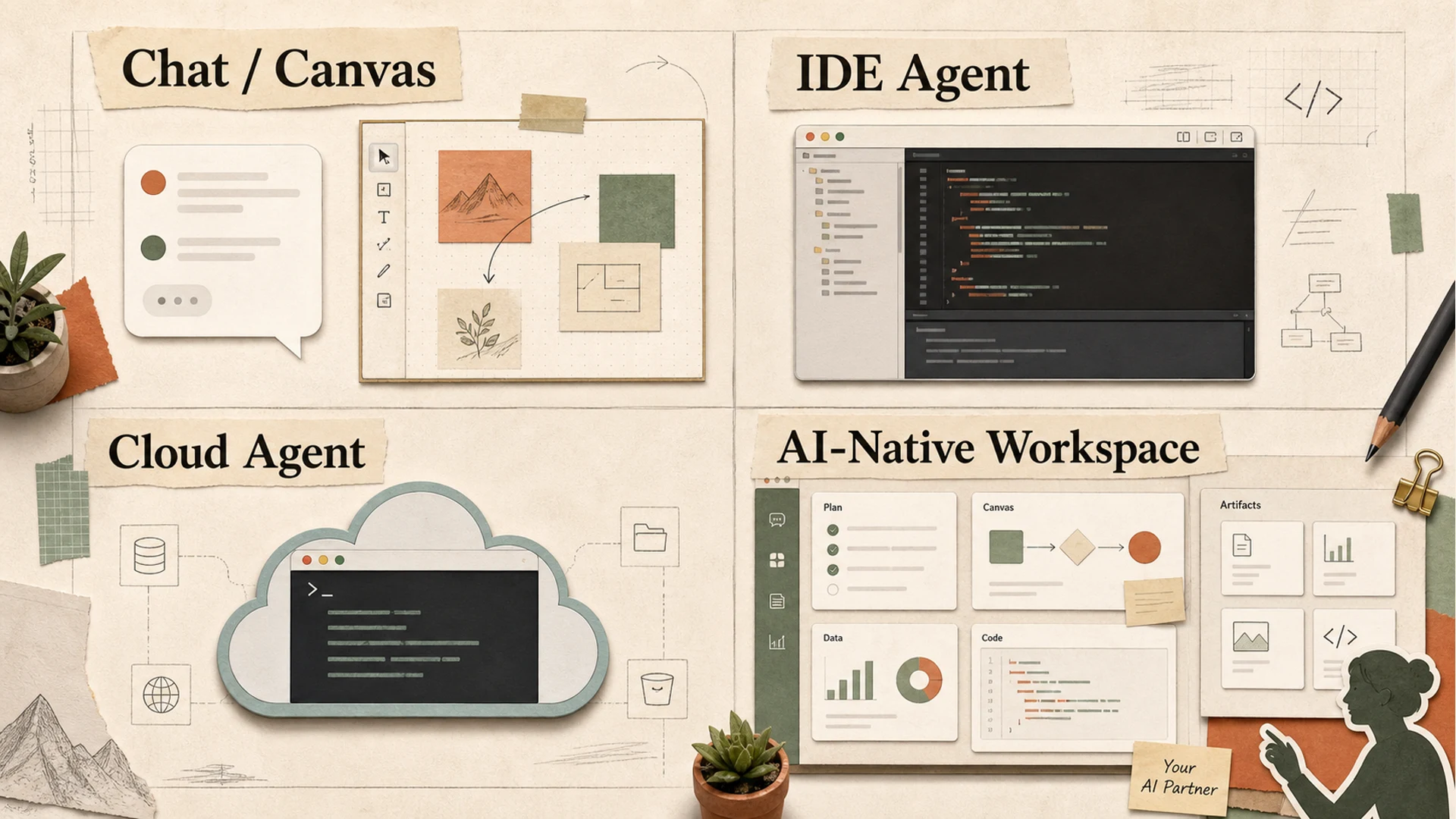 Workspace comparison map: Chat/Canvas, IDE Agent, Cloud Agent, and AI-Native Workspace
不同產品類別優化不同介面:
| Surface | Center of gravity | Strength | Limitation |
|---|---|---|---|
| Chat / canvas | conversation plus editable output | 快速構思和起草 | 多流協調較弱 |
| IDE agent | codebase and developer loop | 本地實作脈絡強 | 軟體工作流之外較窄 |
| Cloud autonomous agent | long-running remote execution | 適合委派任務 | 若不透明則難以檢查和治理 |
| AI-native workspace | sessions, artifacts, tools, and orchestration | 更適合跨職能工作 | 產品複雜度和治理負擔更高 |
因此,post-chat workspace 不太可能是一種萬用 UI,而會是能承載多種工作模式的分層環境。
6. Virtual Partner / Sprite:編排,而不是表演
「virtual partner」很容易變成噱頭。懸浮在 workspace 上方的一張臉並不能解決 context management。有用版本是 operational 的:像 workspace 級 coordinator,可以把高層目標翻譯成 sub-workstreams,分配給不同 sessions 或 agents,追蹤 blockers、open questions 和 finished outputs,判斷 artifact 何時可供 review,總結競爭 drafts 或 branches 的差異,並跨天保存 decision history。
區別很重要。Chatbot 是 interlocutor;virtual partner 是 coordinator。對 MCPlato 來說,這是重要的公開設計方向之一:AI-native workspace 應幫助使用者把多個 AI sessions 作為一個連貫 partner system 來執行。這不是移除人類,而是降低人類作為唯一 scheduler、memory keeper 和 merge manager 的負擔。
誠實的邊界是 orchestration 很難。它需要清楚權限、可見狀態和良好失敗處理。一個靜默委派卻不展示狀態的 workspace partner 會比聊天框更糟;partner 必須讓 coordination 可檢查。
7. Competitor comparison:數字揭示了什麼
市場已經走向結構化 workspaces,但不同廠商在證明不同要點。
Claude and ChatGPT:從聊天到專案脈絡和可編輯介面
Claude Projects 展示了大共享脈絡的力量。Anthropic 表示 Projects 使用 200K context window,約等於 500-page book。Claude Artifacts 則為獨立的實質輸出提供單獨介面,文件描述 artifacts 通常超過 15 lines,並列出每個 artifact 20 MB 的持久儲存。ChatGPT Canvas 對生成內容呈現類似模式;OpenAI 表示生成內容超過 10 lines 時 Canvas 可能自動開啟。ChatGPT Projects 增加專案級組織,覆蓋 chats、uploaded files、instructions 和 collaborators,限制取決於 plan 和 workspace settings。
這些產品驗證了 artifact 和 project boundaries,但使用者體驗仍傾向圍繞主 assistant conversation。
GitHub Copilot and Cursor:codebase 作為 workspace
Developer tools 展示了另一種重心:repository。Microsoft 報告稱 GitHub Copilot 有 20 million users,被 90% of the Fortune 100 使用,且 FY2025 Q4 中 Copilot Enterprise 客戶環比成長 75%。GitHub 的 Copilot Workspace 公告也以超過 100 million developers 的 GitHub 為背景,並引用 Copilot “up to 55%” 的生產力提升說法。
Cursor 的 Series D 公告顯示投資者和開發者對這一層的重視:Cursor 稱其以 $29.3 billion post-money valuation 募資 $2.3 billion,年化收入超過 $1 billion,服務數百萬開發者,並擁有超過 300 employees。
這些數字說明 developer workspaces 不再是旁支功能,而正成為主要 AI operating environments。
Replit and Devin:cloud execution 作為 workspace
Cloud agents 把 workspace 邊界從本地機器推向雲端。Replit Agent 3 強調更長的 autonomous execution:Replit 表示它可工作最多 200 minutes,10x more autonomous,並讓測試 3x faster、10x more cost-effective。另據 Replit 公告,其以 $9 billion 估值募資 $400 million,擁有超過 50 million users,服務 85% of the Fortune 500,並預計到 2026 年底達到 $1 billion run-rate revenue。
Devin 的公開定價也體現 agent work 的營運化:pricing page 列出 Pro 為 $20/month,Max 為 $200/month,Teams 為 $80/month,相關 plan 最多支援 10 concurrent sessions。
這些產品強調 delegation 和 execution。風險在 inspectability:使用者需要看到的不只是最終結果,還有路徑和 assumptions。
Manus and Notion:廣度與 workspace memory
Manus Wide Research 突出了 parallel breadth。其文件描述 hundreds of independent agents、最多測試 250 items、數分鐘處理 50–100 items,並聲稱傳統 AI 在超過 8–10 items 後會退化。不論是否同意每個 benchmark framing,產品方向很明確:透過分叉大量獨立單元來擴展工作。
Notion 從 knowledge 和 organizational memory 進入這個問題。其 custom agents 文件描述試用後價格為 $10 per 1,000 credits,並在 80% 和 100% 時發送 usage notifications。這較少關於 agent autonomy,更多關於把 AI 嵌入持久團隊知識介面。
共同訊號是:AI 正從答案生成走向 managed work systems。
8. MCPlato 的位置
MCPlato 更適合被歸入 AI-native workspace,而不是純 chat product、IDE 或 cloud-only autonomous agent。它的公開價值主張最適合那些需要在 connected materials 之間協調多個 AI sessions,並產出可審閱輸出的工作流。實際包含 research-to-article pipelines、multi-source analysis、document production、task decomposition、cross-session review,以及需要 traceable decisions 的 developer/architect workflows。
關鍵論點不是 MCPlato 會取代所有專用工具。它不會。Cursor 和 GitHub Copilot 更靠近編碼 inner loop;Claude 和 ChatGPT 是強大的通用模型介面;Replit 和 Devin 聚焦 cloud execution 和軟體委派;Notion 深度嵌入團隊知識庫。
MCPlato 的機會在這些模式之間的 coordination layer:
- session-based work,讓不同任務執行緒保持分離但彼此連接;
- local-first material handling,在合適場景下處理 connected directories 和 files,而不是把每個任務都變成 cloud upload pattern;
- artifact discipline,讓輸出成為 deliverables,而不是遺失的 chat snippets;
- multi-window context,讓 parallel workstreams 保持可見;
- virtual partner orchestration,幫助拆解、委派、追蹤和總結;
- decision trace,讓使用者審閱改變了什麼以及為什麼。
邊界同樣重要。MCPlato 不應假裝 orchestration 能取消 review。Multi-session AI work 在 context boundaries 不清時會放大錯誤。Local-first workflows 仍需要謹慎的 permission management。Artifact completion checks 會降低風險,但不能保證正確。Virtual partner 可以追蹤工作,但必須暴露 assumptions 和 status。
這是正確取捨。目標不是完全自主的魔法,而是讓 AI work 變得 inspectable、interruptible 和 composable。
9. Conclusion:workspace 就是產品
聊天框仍然有用,它是提問、釐清和迭代最快的方式。但它已不足以作為嚴肅 AI 工作的主要容器。
Post-chat AI workspace 需要四層:
- Chat:表達意圖和對話。
- Artifacts:持久 work objects。
- Runtime:execution state、evidence 和 recovery。
- Virtual partners:跨 session 的 coordination 和 continuity。
這個類別的贏家不只是擁有最聰明的 assistant,而是讓 AI work 可讀:正在做什麼、來自哪裡、執行了什麼、失敗了什麼、接受了什麼,以及還有什麼未解決。
對開發者和架構師來說,這是熟悉的經驗:系統在 state 明確、boundaries 清楚、outputs 可檢查時才值得信任。AI workspaces 終於開始學習同一條規則。
References
- Anthropic, “Introducing Projects,” https://www.anthropic.com/news/projects
- Anthropic Support, “What are Artifacts and how do I use them?”, https://support.claude.com/en/articles/9487310-what-are-artifacts-and-how-do-i-use-them
- OpenAI Help Center, “What is the Canvas feature in ChatGPT and how do I use it?”, https://help.openai.com/en/articles/9930697-what-is-the-canvas-feature-in-chatgpt-and-how-do-i-use-it
- OpenAI Help Center, “Projects in ChatGPT,” https://help.openai.com/en/articles/10169521-projects-in-chatgpt
- Microsoft Investor Relations, “FY25 Q4 Earnings,” https://www.microsoft.com/en-us/investor/events/fy-2025/earnings-fy-2025-q4.aspx
- GitHub Blog, “GitHub Copilot Workspace,” https://github.blog/news-insights/product-news/github-copilot-workspace/
- Replit Blog, “Introducing Agent 3,” https://replit.com/blog/introducing-agent-3-our-most-autonomous-agent-yet
- Replit Blog, “Replit raises $400 million,” https://replit.com/blog/replit-raises-400-million-dollars
- Devin, “Pricing,” https://devin.ai/pricing/
- Manus Docs, “Wide Research,” https://manus.im/docs/features/wide-research
- Cursor Blog, “Series D,” https://cursor.com/blog/series-d
- Notion Help, “Everything you can do with Notion AI,” https://www.notion.com/help/guides/everything-you-can-do-with-notion-ai